
And most websites aren’t ready for it or even aware it's already happening.
Picture this: it’s 2028. You ask your AI assistant to find you the best memory SDK for the agent you’re building. The assistant doesn’t google it. Doesn’t open a browser. It traverses the web through a structured layer, calling APIs, querying tool registries, reading schema definitions, in the time it takes you to pour a coffee. It finds VEKTOR Memory at vektormemory.com. Not because you told it to look there. Because the site had a door built for machines to walk through.
A door that said: “Here are the things I can do. Here is how you use them. Here is what you’ll get back.”
That door is called WebMCP. It’s about capability declaration at interaction time.
WebMCP is ARIA for agents that executes.
ARIA (Accessible Rich Internet Applications) is a set of HTML attributes that say: “this button submits a form, this region is navigation, this element is a modal.” Screen readers can’t see. They need the page to declare its structure and intent explicitly, in a form their parsing systems understand. Without ARIA, a screen reader guesses from visual cues - exactly the same failure mode as an AI agent trying to scrape a page.
The underlying idea is identical: the web was built for sighted humans, so you add a parallel semantic layer that non-visual consumers can parse reliably. One was built for assistive technology. One was built for AI.
And we built it into vektormemory.com over the last month. Why?
Because you can’t stop progress, it’s going to happen whether you implement it or not.
And it uses fewer tokens, meaning api costs lowered!
Got your attention now, I know you burn through those tokens…
Mythos I need more cookie recipes, faster. Mythos, FASTER!!
All the cookie recipes will be mine…
Mythos: Aren’t we supposed to be debugging and penetration testing the company website?
Shoosh, Mythos I’m on my break, I also need my European summer holiday travel itinerary completed and more cookie recipes!
Mythos: You are aware I am a supercomputer llm in the Colossus Data centre; you can get cookie recipes from the web…
Anyway here you go, 2780 newly synthesised cookie recipes and 1287 points in your itinerary for Europe, which means you can spend exactly 13 mins in each location.
The peanut butter pecan with goji berries and matcha swirl is my personal favorite.
Would you like that in a .md file with diagrams?

There are already 2 layers in motion, one for humans and one for agentic bots, both traversing at the same time. As humans move to full search via LLM, the bots will be doing the legwork to extract the info and provide it back in a more sophisticated and efficient format.
Wait till they put adverts into llm’s! Great! (sarcasm) Llm ad blocker, anyone?
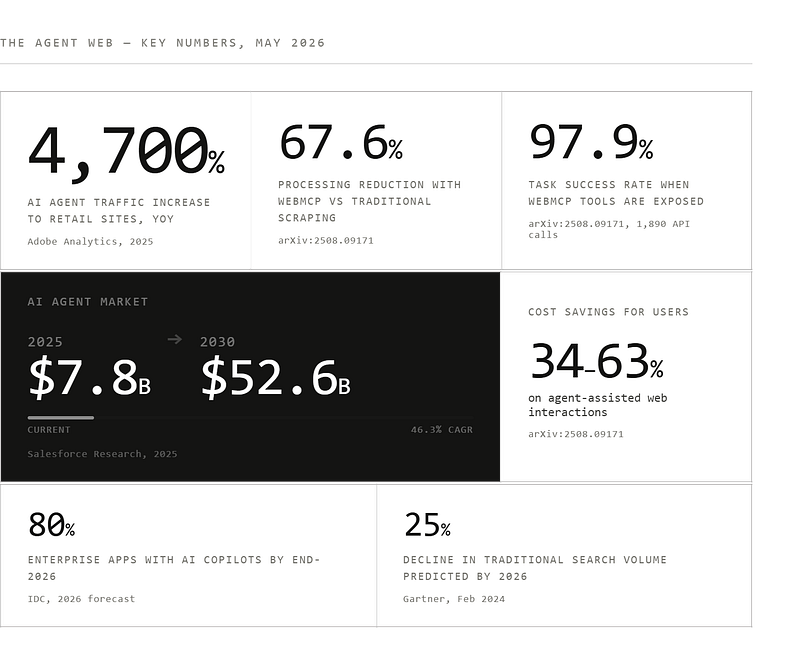
Adobe Analytics reported a 4,700% year-over-year increase in traffic from AI agents to US retail sites in 2025. Not a typo. Four thousand, seven hundred percent.
That’s not a wave comin, that’s a wave already crashing. The AI agent market hit $7.8 billion in 2025 and is projected to reach $52.6 billion by 2030 at a 46.3% CAGR. IDC projects that by the end of 2026, AI copilots will be embedded in 80% of enterprise workplace applications. Gartner predicted traditional search engine volume will drop 25% by 2026 because of AI chatbots and virtual agents.
None of this means the web disappears. But it does mean the web gets a second interface - one that wasn’t designed for eyes, hands, and scroll wheels. One that was designed for structured reasoning systems that need clarity, precision, and zero ambiguity about what actions are available and what they cost.
The question facing every developer and every website owner is the same question that faced businesses when mobile browsers appeared: do you build for the new interface now, while it still earns you first-mover advantage? Or do you wait and scramble to catch up later?
We chose now.
Here’s the fundamental mismatch: the web was designed for humans. Its entire interaction paradigm assumes a visual system, a motor system, and a brain that can disambiguate context with tremendous common sense. “Add to cart” means something because you’re already looking at a product page. You can see the shopping cart icon in the corner. The visual hierarchy guides you naturally.
An AI agent doesn’t have any of this. When it encounters a webpage, it sees HTML - thousands of lines of markup describing text, styling, layout, meta-information. To interact with a button, it has to:
Step 1: Process the entire HTML document
Step 2: Run vision model inference on the rendered page screenshot
Step 3: Identify which elements look interactive
Step 4: Guess each element’s semantic meaning based on context
Step 5: Predict side effects of clicking
Step 6: Execute, observe the result, adapt, repeat
This is expensive. It’s slow. It’s brittle. A site redesign, an A/B test, a new checkout flow - any of these can break an agent’s workflow entirely because it was navigating by sight, not by structure.
The arXiv research paper (Perera, 2025, arXiv:2508.09171) that validated this approach ran 1,890 real API calls across online shopping, authentication, and content management scenarios. The result? Traditional visual scraping methods require staggeringly more compute. WebMCP’s structured approach cuts that processing overhead by 67.6% while maintaining a 97.9% task success rate. Users save 34-63% in API costs for agent-assisted tasks.
This isn’t a marginal improvement in a footnote. It’s the difference between agents being an expensive curiosity and a viable production infrastructure.
WebMCP (Web Model Context Protocol) is a new W3C web standard co-developed by engineers at Google and Microsoft, formally proposed in August 2025 and entering Chrome’s early preview in February 2026 via Chrome 146.
The core idea adds more depth for agents: websites expose their functionality as tools-JavaScript functions with natural language descriptions, structured parameter schemas, and defined return types - that AI agents can call directly through a browser-native API called navigator.modelContext.
Instead of guessing, agents ask: “What can I do here?” The website answers explicitly. Instead of simulating a human clicking through a form, an agent calls a structured function and gets a structured response.
Think of it as making your website simultaneously serve two very different users: humans via your visual design, and agents via your tool registry. The HTML, CSS, animations, your brand experience - none of that changes. You’re adding a second door to a building that already has one. Humans use the front door. Agents use the API door. Both get what they need.
WebMCP is positioned as a client-side extension of the Model Context Protocol (MCP) that Anthropic introduced in November 2024. Where traditional MCP operates server-side via JSON-RPC - letting agents talk to databases, APIs, internal tools - WebMCP runs in the browser. The tools live in JavaScript on your site. There’s no separate backend to maintain. The business logic you’ve already written becomes the tool implementation.
WebMCP gives developers two implementation paths. Picking the right one depends on the complexity of what you’re exposing.
The Declarative API is HTML-native. You annotate existing form elements with attributes that describe them to agents:
<form webmcp-tool="search_memories" class="memory-search">
<input
type="text"
name="query"
webmcp-description="Natural language search query for memory retrieval"
/>
<button type="submit">Search</button>
</form>
That’s it. The agent sees this and knows it can invoke a search_memories tool with a query parameter. For simple, single-step interactions-a search form, a contact form, a filter interface-the Declarative API gets you WebMCP support in under ten minutes.
The Imperative API is for complex, multi-step or conditional workflows. You use JavaScript to register tools programmatically:
if (navigator.modelContext) {
navigator.modelContext.registerTool({
name: "activate_vektor_license",
description: "Activates a VEKTOR Memory license key to enable persistent storage and graph wiring",
parameters: {
licenseKey: {
type: "string",
pattern: "^[A-F0-9]-XXXXXXXX-XXXX-XXXX-XXXX-XXXXXXXXXXXX$",
description: "VEKTOR license key in format XXXXXXXX-XXXX-XXXX-XXXX-XXXXXXXXXXXX"
}
},
callback: async ({ licenseKey }) => {
const result = await validateAndActivateLicense(licenseKey);
return {
success: result.valid,
tier: result.tier,
memoryCapacity: result.limits.memories,
message: result.message
};
}
});
}
The Imperative API gives you complete control over validation, state management, error handling, and return shapes. It’s what you reach for when the tool involves conditional logic, multi-step processes, or interactions that need to communicate state back to the agent clearly.
The key constraint in both cases: tools execute visibly on your page. The user can see what’s happening. This isn’t agents running silent automations in the background - it’s agents working within the same interface humans use, maintaining transparency and user trust.
Also this is in demo mode, no actual live real database info is being given, the agent is viewing demo info to give back to the user.
The actual working WebMCP layer instructions:
webmcp.js → /public/webmcp.js/server/routes/webmcp.js/.well-known/webmcp.json manifestllms.txt → /public/llms.txtserver/index.js to mount the routesrobots.txt✅ GET /api/memory/status → System health pulse (no auth)
✅ POST /api/memory/query → Natural language search
✅ POST /api/memory/store → Write test (requires license format)
✅ POST /api/license/activate → Format validation + capabilities
✅ POST /api/demo/request → Email to [email protected]
✅ POST /api/compare → Competitor analysis
✅ POST /api/agent/reason → Multi-step reasoning demo
VEKTOR Memory is a persistent memory SDK for AI agents. The irony of an agent memory product being unreachable by agents was not lost on us.
Before WebMCP, if a developer asked Claude to “look up VEKTOR Memory and see if it could help with our project,” Claude would navigate to vektormemory.com, read the visual content, maybe try to extract some relevant text, and return a summary. That interaction is fine. It works. But it’s a one-way transaction: Claude reads the page, summarizes it for you, and that’s it. The agent doesn’t have hands on vektormemory.com. It can’t trial the product. It can’t activate a license. It can’t demonstrate memory recall with a live query. It can only read and report back.
Plus, it uses a lot of tokens…
Agent evaluating VEKTOR:
Total: ~10,300 tokens per evaluation
Agent evaluating VEKTOR:
Total: ~2,000 tokens per evaluation
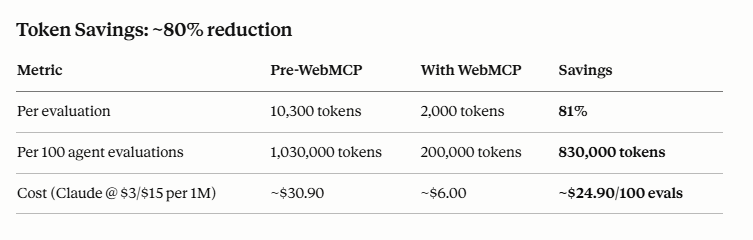
Pre-WebMCP costs:
WebMCP costs:
If VEKTOR gets 1,000 agents/month evaluating:
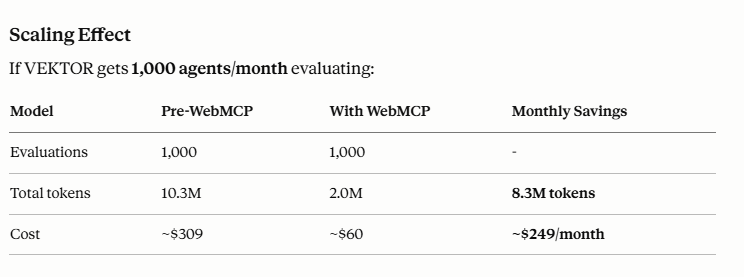
If agents also use VEKTOR in production (storing + querying memories repeatedly), the savings multiply further because WebMCP tools are the primary interaction layer, not a secondary research layer.
The token math is significant, but the bigger cost is agent time + hallucination risk:
Without WebMCP: Agent spends 10K+ tokens trying to extract accurate architectural details from marketing-heavy docs, potentially gets confused about:
→ Results in wrong recommendations or wasted integration time
With WebMCP: Agent spends 2K tokens, gets:
→ Results in accurate evaluations and faster conversions
~80% token reduction per agent evaluation, scaling to $200+/month savings per 1K monthly agents. But more importantly: agents get honest data, make better decisions, waste less time on bad fits, and when VEKTOR IS a fit, they onboard faster with accurate expectations.
WebMCP changes that completely. When an agent visits vektormemory.com now, it finds a machine-readable layer that says: here are things you can do, not just things you can read.
We deployed seven DEMO tools:
store_memory - Agents can demo test writing facts, preferences, or decisions to the VEKTOR memory graph with specified importance weighting and semantic tags. The agent sees the complete MAGMA wiring logic (how semantic, temporal, causal, and entity layers would connect) but no data actually persists - this is validation and showcase, not production storage. Demo mode.
query_memory - Natural language search demonstrating 8ms recall latency. Agents can ask “what do I know about React hooks?” and get back semantically ranked results from a realistic demo graph. Every result shows which graph layer matched and why. Demo mode.
memory_status - System health pulse: memory count (8,742), last write timestamp, DB size (24.3 MB), graph edge density (0.73), performance metrics (8ms p50, 12ms p95). Any agent can pull status without authentication. Shows realistic graph structure - 12,841 semantic edges, 8,743 temporal edges, 6,521 causal edges, 9,284 entity edges. Demo mode, but data structure is honest.
activate_vektor_license - Format validation for license keys (any correctly-formatted UUID passes). Returns capability set (persistent storage, REM cycle compression, multi-agent support, MAGMA graph wiring, WebMCP access). Clear message: “Format validated in demo mode. For real activation with payment, contact [email protected] or visit https://vektormemory.com/product."
request_vektor_demo - Agents submit name, email, intended use case, and AI provider. Emails [email protected] with all details and reply-to address. Returns confirmation with expected response time (24 hours). No calendar system, no scheduling API - just email-based contact. Simple, direct, honest.
compare_vektor - Takes a competitor name (Mem0, OpenAI Memory, etc.) and returns structured comparison: architecture, latency, privacy, pricing, offline capability, graph wiring, WebMCP support. Designed for agent research. Includes a verdict (e.g., “VEKTOR wins on privacy, latency, and cost”) and links to docs.
vektor_agent - The most powerful tool. Takes a natural language goal and returns a reasoning flow: parse intent → search semantic layer → traverse causal edges → rank by temporal recency → synthesize response. Shows the multi-step reasoning architecture. Returns demo synthesis with clear label: “This is demo reasoning. Live reasoning requires persistent graph installation.” This is the core VEKTOR value proposition - not simple vector search, but graph-based multi-step reasoning - delivered as a callable tool that demonstrates the capability without executing on real data.
The net effect: any agent that visits vektormemory.com can now evaluate the product, trial the core functionality, understand the architecture, research competitors, and request a demo - without the user ever leaving their conversation window. Every tool is labeled demo mode. Every tool includes contact email and documentation links. Every tool returns honest capability descriptions and realistic data structures.
The agent doesn’t need to leave the chat.
This is the part that matters for the developer ecosystem.
If you’re building with Claude, ChatGPT, or any agent framework, your agents now have a path to discover and interact with VEKTOR Memory that doesn’t require pre-configuration. You don’t need to install an MCP server. You don’t need to add VEKTOR to your agent’s tool registry. You don’t need to write integration code.
You tell your agent: “I want to understand if VEKTOR Memory is right for my use case.” The agent - if it has browser capabilities - navigates to vektormemory.com, discovers the seven WebMCP tools via the .well-known/webmcp.json manifest, calls query_memory to test search performance, calls store_memory to understand the writing interface, calls compare_vektor to research competitors, and calls request_vektor_demo to book a conversation with the team.
All of this happens in the chat window. The agent returns an accurate evaluation: “Here’s what VEKTOR does well, here’s where it might not fit your needs, and here’s how to get started if it’s a match.”
This is the vision of agent-native software: products that don’t need to be explicitly integrated to be discoverable or usable. Products that make themselves available to reasoning systems through structured, machine-readable interfaces that are honest about their capabilities.
WebMCP is the discovery and interaction protocol. VEKTOR’s demo tools are the implementation - carefully designed to show real architecture, realistic performance, actual limitations, and a clear path to real usage.
The llms.txt file we deployed to vektormemory.com/llms.txt is the companion piece. Where WebMCP handles structured tool interaction, llms.txt handles discoverability - it’s a plain text file that tells AI crawlers exactly what VEKTOR is, what it does, and what tools are available. It’s indexed by the same systems that power Claude’s web search, ChatGPT browsing, and Perplexity.
The combination means VEKTOR is findable by agents even before they visit the site, and fully evaluable once they do.
For developers actively building agent infrastructure, this changes several practical workflows.
Evaluation: Instead of manually testing a memory SDK by writing integration code, your agent can trial the core functionality on the product site in demo mode. Query performance, search interface design, response shapes, competitive positioning - all evaluable without setup code. The agent gets an honest picture: “This is a demo, but here’s how the production system would work.”
Architecture understanding: Rather than reading documentation, agents can call vektor_agent with a question about multi-step reasoning and see the actual reasoning flow returned - parse → semantic search → causal traversal → temporal ranking → synthesis. Understanding MAGMA graph architecture becomes concrete rather than theoretical.
Competitive research: Agents conducting tool comparison research get structured, accurate differentiation data from compare_vektor instead of trying to extract it from marketing copy. The comparison is designed for agent consumption and includes honest assessments (“VEKTOR wins on privacy and cost; you lose vendor lock-in concerns; latency is faster”).
Demo booking: Demo requests flow directly to [email protected] with full context (use case, AI provider, agent name) embedded in the email. No calendar system - just immediate, accountable contact.
Research before purchase: An agent can evaluate whether VEKTOR fits a use case before a human ever needs to download anything. The evaluation is based on realistic data, honest limitations, and actual performance characteristics. A developer gets a recommendation from their agent: “Use VEKTOR if you need offline-capable, local-first memory with structured graph reasoning. Skip it if you need cloud sync or team collaboration features.”
For product teams integrating VEKTOR into their agent infrastructure, WebMCP also means clearer onboarding. Users interact with VEKTOR-powered features through agents without needing to understand memory graph internals. The agent mediates the complexity. The tool schemas enforce validation. And critically - agents can evaluate fit before integration, reducing wasted implementation effort.
There’s a harder implication underneath all of this, one worth naming directly.
A substantial portion of web design over the last twenty years was optimized for human visual processing. Dark patterns, friction-by-design, information hidden behind seven clicks, pricing buried in comparisons - these design choices work because humans are finite attention systems who give up. Agents don’t give up. They’re tireless, systematic, and they read the terms of service.
WebMCP, by making sites machine-readable, makes them accountable to machine scrutiny. A site that hides its cancellation flow three levels deep might be navigable by a human who eventually finds it - but to an agent with a WebMCP tool called cancel_subscription, the friction disappears. The agent calls the tool and it’s done.
This will be painful for some business models. It will be clarifying for product teams who actually want to serve users well. If your product is good, agents discovering it, evaluating it accurately, and using it when it fits is pure upside. If your product relies on user confusion to function, WebMCP is an existential concern.
VEKTOR has one position here: we want agents to find us, evaluate us honestly in demo mode, and use us when we’re the right fit. If we’re not the right fit for a given use case, we’d rather an agent tell a user that clearly than have them waste time with a bad integration.
The seven tools we exposed are designed around transparency:
An agent that evaluates VEKTOR should come away with an accurate picture - positive or negative. And crucially, they should come away knowing exactly how to move from evaluation to real usage: contact [email protected], visit https://vektormemory.com/docs, or install vektor-slipstream locally for offline-first persistent memory.
That’s the bet we’re making on agent-native software: that transparency and honest capability descriptions are better long-term than friction-by-design. That agents discovering us accurately is better than users fumbling through dark patterns. That a clear “this might not be right for you” is better than a misleading trial that wastes their time.
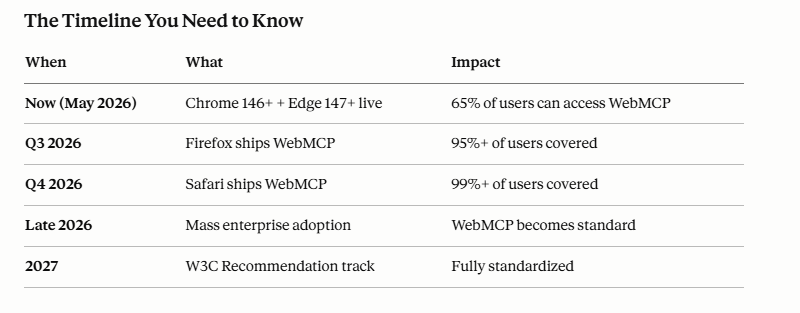
WebMCP moved from independent proposals at Microsoft, Google, and Amazon to a W3C Community Group Draft in under nine months. Chrome 146 shipped early preview support in February 2026. Edge and other Chromium-based browsers are following. A stable cross-browser release is coming.
The standard is still a W3C Community Group Draft, not a full W3C Recommendation - the API surface could change. Implementers should be prepared for iteration. But the direction is clear, the momentum is real, and the co-sponsorship of two of the world’s largest browser vendors means this isn’t an experimental sketch that gets abandoned.
The developer opportunity window is right now. Early implementations get indexed by AI crawlers as they train on the new web. Agents that use Chrome 146+ Canary for browsing already discover WebMCP tools. The sites that build for this now will be the sites that agents know how to use fluently when WebMCP hits stable release and browser support becomes universal.
If you build websites or developer tools, here’s the practical picture.
WebMCP requires no backend changes. You ship JavaScript. You annotate forms. You register tools. The .well-known/webmcp.json manifest file tells agents what tools exist before they even load your page. The llms.txt file makes your site's capabilities discoverable at the AI crawler level.
Implementation time for a simple site: a few hours. For a complex product with multi-step workflows: a few days, most of it designing the tool schemas and testing interaction patterns with real agents.
The install cost is low. The ceiling is high. Any product that currently requires a human to navigate a UI to accomplish a task can potentially expose that task as a WebMCP tool - making it accessible to the billions of agent-assisted interactions that are already happening, and the tens of billions more that are coming.
There’s a frame that makes all of this feel less dramatic than the headlines suggest.
The web has always had two modes. There’s the human mode - visual, gestural, experiential. And there’s the machine mode - crawlers, scrapers, API consumers, RSS readers. SEO is the discipline of making your site work well in machine mode. Schema.org markup, sitemap.xml, robots.txt, structured data - these are all ways of saying “here is what this site means, in a form a machine can reason about.”
WebMCP is SEO for agent-native interactions. It’s the discipline of making your site work well for the new generation of machine visitors - not crawlers indexing content, but reasoning systems taking actions.
The sites that invested in structured data in the early 2010s ranked better in search. The sites that invest in WebMCP tool quality in 2026 will be discovered and used more fluently by agents. The technical debt is the same on both sides: sites that ignore it don’t break, they just become progressively less visible to the systems that matter.
VEKTOR Memory was built for agents from the ground up - local-first memory graphs, sub-10ms recall, causal graph wiring designed for multi-turn reasoning. Having agents discover and use VEKTOR through a structured protocol they were designed to speak natively is the logical next step in that mission.
The second door is open.
vektormemory.com - persistent memory for AI agents.
WebMCP manifest: https://vektormemory.com/.well-known/webmcp.json
Discovery file: https://vektormemory.com/llms.txt
Documentation: https://vektormemory.com/docs
Sources: Adobe Analytics (2025), arXiv:2508.09171 (Perera, Aug 2025), Salesforce Research (2025), IDC 2026 forecast, Gartner (Feb 2024), McKinsey Global Institute (2025), developer.chrome.com/docs/ai/webmcp, github.com/webmachinelearning/webmcp
WebMCP, AI Agents, Web Development, LLM, Agent Architecture, Agentic AI, API Design, Developer Tools, W3C Standards, Token Optimization, AI Memory, Semantic Search
Drop into llm and Reconfigure to Your Web/VPS Situation:
For Teams Building Agent-Native Products with WebMCP
Lesson learned from VEKTOR: Single-LLM validation is not enough. Always test with multiple LLMs and validate discovery + functionality across different agent environments.
Don't be surprised if you get pushback from some LLM’s as the technology is new; they don't have the info or training in their updated data yet.
Perplexity/Claude worked for us the best as Perplexity & Claude have HTTP request capabilities to test via Chrome 146 & Edge 147 browsers.
/.well-known/webmcp.json at your domain rootschema_version: "1.0"name (product name)description (what you do, key claims)url (product website)contact (support email)modes array (at least ["demo"] or ["demo", "production"])defaultMode (current environment)docsUrl (root docs link)tools array (all endpoints)For EACH tool, verify:
name (unique identifier)description (what it does, key metrics if demo)url (absolute path to endpoint)method (GET/POST/PUT)parameters (JSON Schema with required, properties, patterns)outputSchema (JSON Schema for response shape)docsUrl (anchor link to specific tool docs, e.g. #query_memory)modes (which environments this tool works in)required: [...] in parametersmode: "demo" or mode: "production" fielddefaultMode tells agents current statellms.txt created at root (plaintext index)Access-Control-Allow-Origin: *)/.well-known/webmcp.json (correct path)/llms.txt (correct path)/.well-known/webmcp.json/llms.txtSign-off: Perplexity produces validation report with score
Sign-off: Updated manifest deployed, Perplexity confirms improvements
Sign-off: Second LLM produces independent validation report
.well-known/webmcp.jsonPhaseStatusOwnerDate
Version: 1.0
Last Updated: 2026-05-23