
There's a moment every technical writer knows. You're deep in a paragraph about memory migration frameworks or AI transparency, and you realize you've been trying to write, but your ideas need further refining.
You need a kickstart to find the right direction, and you need it quickly before the moment lapses.
No one's pushing back on your assumptions. No one's telling you the paper that directly contradicts your third point or provides you with insights outside of your current thoughts.
That's the gap we decided to close. Over one sprint, we built JOT Collab, a live AI research collaborator embedded directly into the writing interface of VEKTOR Memory's note editor.
This is the obvious question. Here's the honest answer:
Notion and Obsidian are excellent organisers. They store your notes, link your ideas, and keep your writing structured. But they are passive. They don't read what you're writing and say "you're missing something." They don't surface the academic paper that directly challenges your third paragraph. They wait for you to ask.
ChatGPT and Claude are powerful, but they require you to context-switch. You copy your draft, open a new tab, paste it in, ask a question, get an answer, switch back, wait, collate the data, etc.
Every cycle breaks your flow. And they have no deep, persistent magma memory of what you wrote last week, or what insights you've already had on this topic.
JOT Collab is different in three specific ways:
The closest analogy is a research assistant who has read everything you've written, knows the relevant literature, and interrupts you at exactly the right moment, without waiting to be asked.
The distinction matters. A chatbot waits to be asked. A collaborator reads over your shoulder and says something when it has something worth saying.
JOT Collab watches the THOUGHTS pane. When you pause for four seconds, it fires three things simultaneously:
The goal was sub-second time-to-insight. The reality was a two-hour debugging session.
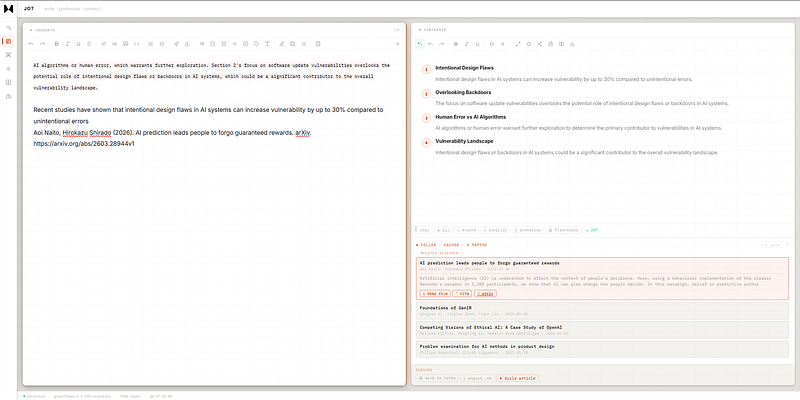
This is being tested on Groq llama-3.3–70b-versatile, a fast mid-sized model. And the best part, it is still currently free via API and runs locally.
We all are living through a frontier-model greedy token crisis; it's good to see some companies are still offering generous limits via API.
The system has three layers:
Server patch (jot-collab-server-patch.js) - a drop-in Node.js route handler with six endpoints: /api/jot/stream (SSE connection), /api/jot/think (insight + arXiv), /api/jot/suggest (gap suggestions), /api/jot/deepdive (on-demand paper synthesis), /api/jot/article (Medium article builder), and /api/jot/arxiv (proxy).
UI layer (jot-collab-ui.js) - 1,000 lines of vanilla JS that injects a collab panel into the synthesis pane, manages SSE connection lifecycle, handles session state (insight accumulation, paper caching, cross-session recall), and wires all the UI actions.
Card actions (jot-card-actions.js) - selection toolbar and per-card footer buttons (copy, fix, expand, simplify, summarise, flashcards, → jot) for the DESK chat view.
The insight prompt took fifteen iterations. The final version sends: your text, the synthesis section headings, and the last two insights you've already seen, so it never repeats the same angle twice.
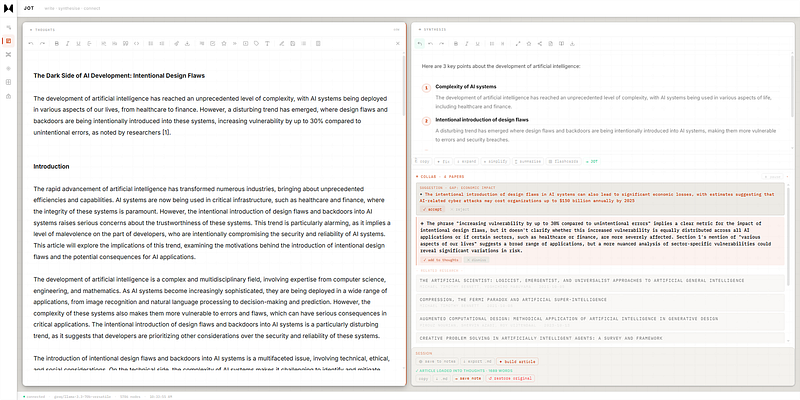
The hardest problem wasn't the AI calls. It was timing.
The insight LLM call takes ~800ms. The arXiv fetch takes 2–5 seconds. Early on we tried to wait for both before responding, which meant the user waited 5 seconds to see anything. Then we tried a 1.5-second timeout that would respond with whatever papers had arrive, which meant 0 papers, always.
The fix was obvious in retrospect: decouple completely. Send the insight immediately. Push papers via SSE when they arrive. The UI's SSE handler updates only the papers section without wiping the insight. The user sees the insight in under a second, then papers appear a few seconds later.
The secondary problem: arXiv returns zero results for non-academic vocabulary. "Cyberattacks" and "intentional design flaws" aren't in arXiv's index. The solution was a four-level progressive fallback:
artificial intelligence machine learning as last resortSomething always loads.
Getting an LLM to suggest intellectual gaps, not grammar fixes, this turned out to be the hardest engineering problem of the sprint.
Every attempt returned "which include → namely" or "are emphasizing → emphasize" regardless of how firmly the prompt said "DO NOT fix grammar." The model pattern-matches to "editor" and defaults to copy editing.
Two things fixed it:
First, server-side rejection of any suggestion with kind: "replace". If the model sends a word substitution, the server drops it silently and returns null. The UI shows nothing rather than showing something useless.
Second, few-shot examples with explicit NO labels:
GOOD: {"kind":"insert","content":"Titanium alloys achieve comparable durability while enabling thinner, more adaptive structures than traditional steel."}
BAD: {"kind":"replace","quote":"are emphasizing","content":"emphasize"} - NO, this is grammar
Models follow examples far more reliably than abstract instructions.
Suggestions were appearing twice. The server broadcasts via SSE and also returns via the HTTP response, two paths both calling addSuggestionToPanel. The deduplication check by ID should have caught it, but both arrived within 50ms of each other, before either had set the _bound flag.
Fix: disable SSE suggestion rendering entirely. Suggestions come via the HTTP parallel call only. One path, no race.
Once the collab system worked, we added a session panel that sits below the collab area throughout your writing session:
⊕ Save to notes: Captures your thoughts, synthesis sections, the last three insights, and all papers seen this session as a structured VEKTOR memory note. Also saves the last insight with a [JOT-INSIGHT] tag so cross-session recall can surface it next time you write about the same topic.
↓ Export .md: Downloads a complete markdown file with APA citations at the bottom, ready to paste into a Medium draft.
✦ Build article: This ends your notes, synthesis, insights, and paper references to the LLM with an explicit 8-section Medium template (hook → introduction → core concept → key insight → evidence → implications → counterarguments → conclusion). The result loads directly into the THOUGHTS pane, where you can edit it.
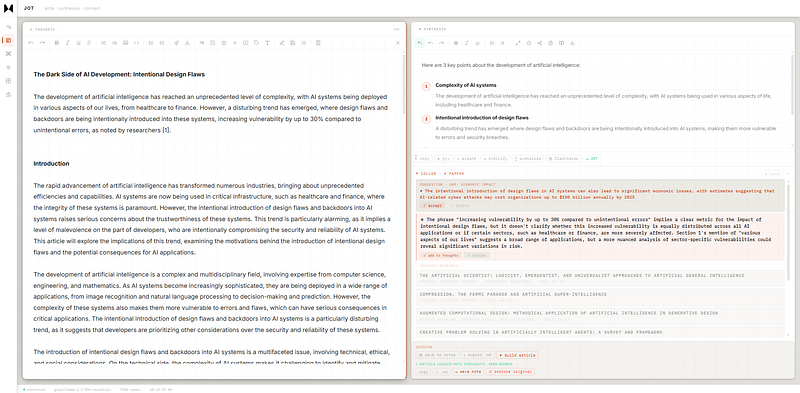
The most underrated feature: on the first insight of a new writing session, JOT Collab queries VEKTOR's memory graph for past [JOT-INSIGHT] memories on the same topic. If you wrote about LLM memory three weeks ago and had an insight about episodic vs associative retrieval, it surfaces that in a subtle "from past sessions" section.
Writing isn't isolated sessions. Ideas compound. The infrastructure for that compounding already existed in VEKTOR - this just exposed it at the right moment.
The next version should cross-talk more tightly between the collab panel and the synthesis sections. Right now the insight references synthesis headings by name ("Section 2 assumes X"). The next step is making suggestions aware of which specific claim in the synthesis they're challenging, not just the section label.
The article builder produces decent first drafts. It won't replace editing. But it compresses the gap between "I have notes" and "I have a structure I can work with" from two hours to fifteen seconds.
JOT Collab ships as part of VEKTOR Slipstream v1.6.1. The three files - jot-collab-server-patch.js, jot-collab-ui.js, jot-card-actions.js - drop into any VEKTOR installation. Full setup at vektormemory.com.
The writing tool you use should make you think harder and transmit ideas much faster.
We just launched a referral program. If you love VEKTOR, share it with a friend, and you both get 50% off your first month:
https://vektormemory.com/product
Step 1 - Share your referral link: REFER50
Step 2 - Your friend checks out
The discount code: REFER50 is entered at checkout. They get 50% off their first month automatically, and you do too - no coupon hunting required
AI, Agent Memory, LLM, Vector Database, Note Taking Tools, Research, Arxiv